Changelog

Answers first, with the work folded away

Finished answers fold their working steps away, notifications move into the sidebar, and new table rows appear the moment you add them.

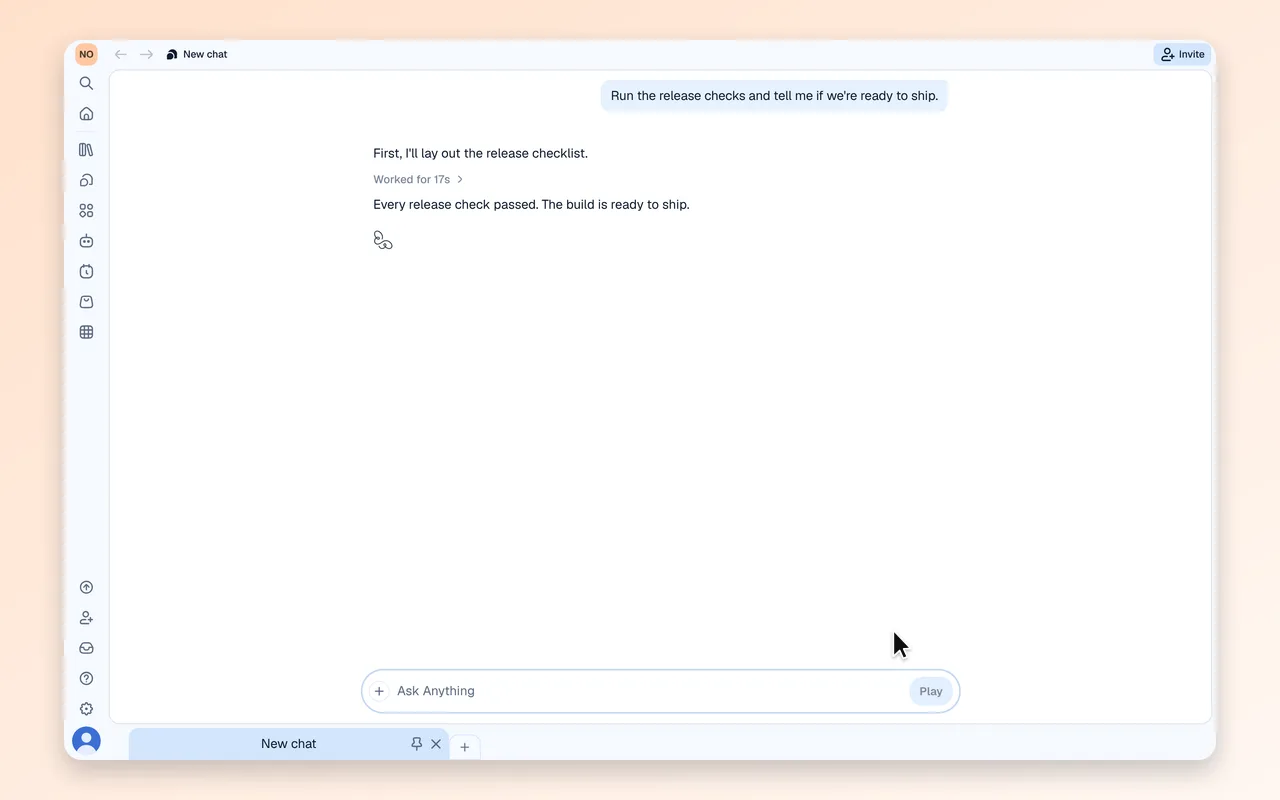
Finished work folds out of the way

Once an answer is ready, every step behind it folds under one Worked for line, so the answer is what you see. Click the line to open the steps again; questions and results always stay in view.

Also in this release

  • Notifications now live in the sidebar panel, with filters, grouped stacks and mark all as read; turn off a kind of notification from its menu, and turn it back on under Settings > Notifications
  • New rows appear the moment you add them, in tables and in published apps; in a table, a row that fails to save keeps your values with Retry and Discard
  • Connected tables and app actions open in a resizable split beside the app preview, so the chat stays in view, and they now come in dark mode
  • Attached images open in a full-screen lightbox, and upload tiles are easier to read and no longer jump around
  • Chats waiting on your answer are marked on their tab and in the sidebar
  • The sidebar chat filter searches message text as well as titles
  • Send a queued message right away with Send now
  • A message lost to a reload before it was answered comes back as a draft
  • Install a template straight from its card in the sidebar, and the new app's chat opens for you
  • Share an app as soon as it is built; the first share publishes its latest version